Windows 10/11 + macOS · official release

analysis toolkit

CUE•TONE

Choose the right track.
Keep the whole set flowing.

CUE•TONE 2.7.2 helps DJs and producers analyze Key, BPM, Energy, Integrated LUFS and Quality so you can choose tracks faster and keep the whole set flowing.

NEW IN 2.7.2Fixes a Windows startup Unicode subprocess issue; adds Vietnamese / English, a compact CUE ASSIST source column, and safer scrolling controls.

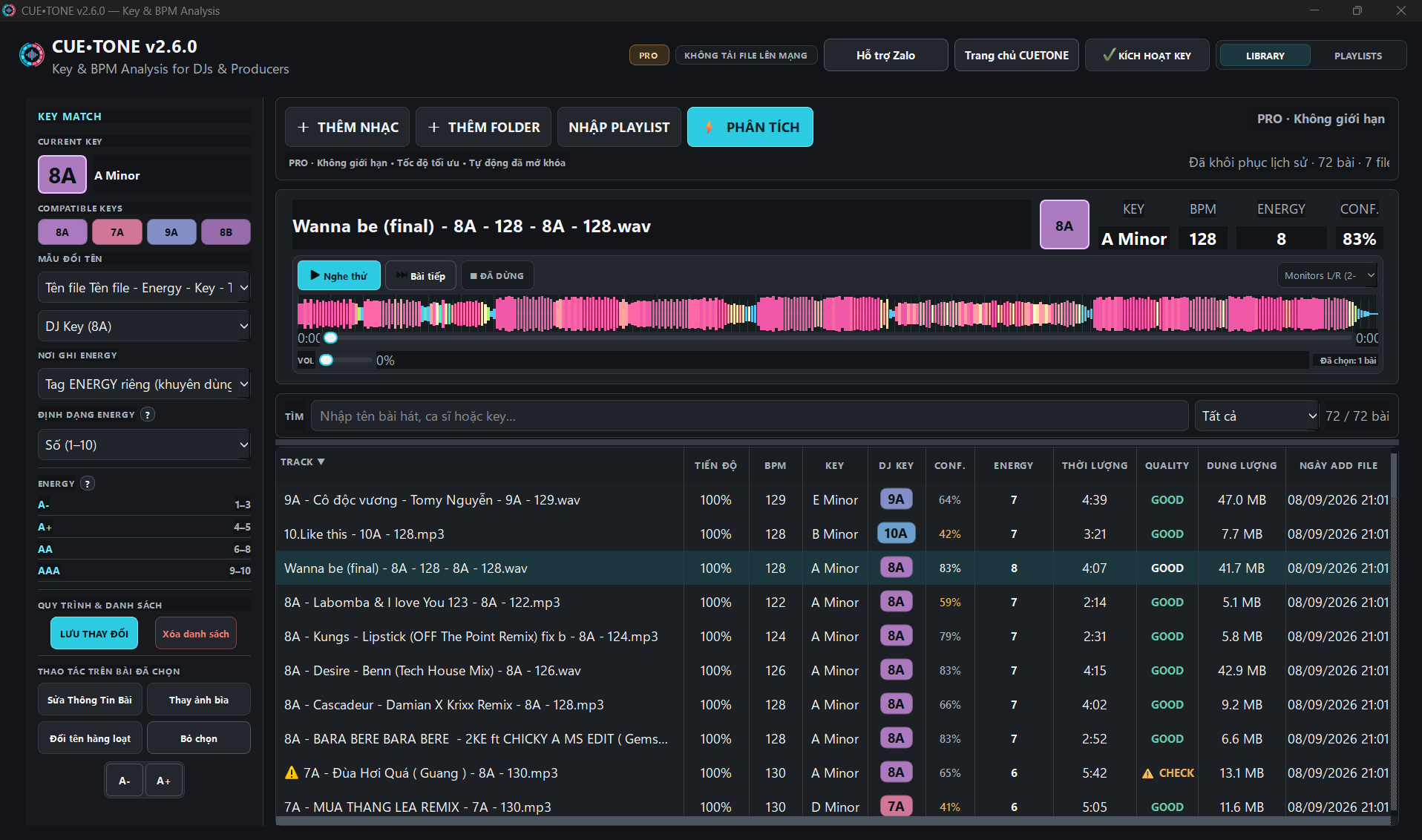
CUE•TONE interface preview with KEY MATCH, playlist, Key, BPM, Energy, and Quality
Interface previewPlaylist · Key · BPM · Energy · Quality
01 / SEE IT IN ACTION

Explore CUETONE.

Analyze Key, BPM, Energy, and Quality to make your DJ workflow more efficient.

CUETONE / PRODUCT TOUR

See the signals. Keep the flow.

See how CUETONE connects the signals that matter in your library, so you can prepare playlists and choose the next track with confidence.

CUETONE promo video · 00:12 · use the controls to turn sound on.

PROMO / CUETONE00:12
01 / SET PLAYLIST

From library to a complete set.

Filter tracks by Key, BPM, Energy, and Quality, then arrange them into a clear-flow playlist to prepare your set faster.

PLAYLIST WORKSPACE

Choose tracks. Shape the flow. Ready to play.

CUETONE analyzes your library on your computer so you can see each track's signals clearly and decide faster. Your music files never leave your device.

01 ·

Choose tracks

Quickly filter suitable tracks from your library.

02 ·

Shape the flow

Arrange your playlist by Key, BPM, Energy, and the vibe of your set.

03 ·

Export

Export the playlist and continue in your DJ workflow.

SET PLAYLIST / 16 TRACKSEXPORT
01Library16 tracks
02FilterKey · BPM
03Arrange7 matches
04ReadyExport set
BPM 117–129KEY MATCHENERGY 6–8QUALITY GOOD
TRACKS16
BPM117–129
KEY MATCHES7
AVG ENERGY6.8
QUALITYCHECKED
PLAYLIST FLOWKEY · BPM · ENERGY
0110A · The Weeknd x Playboi Carti10A130
021A · Di Giữa Trời Rực Rỡ1A130
0310B · G-DRAGON — Crooked10B130
PLAYLIST READY16 tracks · 1h 19m · export available
02 / SIGNALS

Read the signals. Choose the next track.

CUE•ASSIST turns Key, BPM, Energy, Integrated LUFS, and play history into clearer next-track suggestions for DJs.

UPDATED IN 2.7.1CUE•ASSIST

CUE ASSIST — Smarter transitions

Analyze Key, BPM, Energy, and compatibility to find the right next track faster.

  • Suggest tracks that fit what is playing
  • Combine Key, BPM, and Energy
  • Build a DJ set flow faster
Download CUETONE freeKeep the flow without stopping to search for every track.
LIVE DEMOCUE ASSIST / 01:07

See CUE ASSIST working inside CUETONE.

01

Key

Identify harmonic keys clearly to find smoother transitions and build an intentional set.

02

BPM

Keep the tempo and see relationships between tracks in one view.

03

Energy

Understand a track's energy, mood, and place in the flow of your set.

04

LUFS

Measure perceived loudness so you can spot tracks that are too loud or quiet and balance the mix more evenly.

05

Quality

Detect low-quality audio with Quality Scan and flag spectra below 18.5 kHz.

06

CUE•ASSIST

Suggest the next track using Key, BPM, Energy, and play history, so you can choose a better-flowing track faster.

07

Edit Tag

Edit metadata and batch-rename more powerfully, writing Key · BPM · Energy into filenames for your workflow.

08

AUTO PLAYLISTS

Automatically build and arrange playlists using Key, BPM, Energy, and Quality to prepare sets faster and keep transitions coherent.

03 / LOCAL-FIRST

Your music files stay local.

CUE•TONE reads Key, BPM, Energy, and Quality directly on Windows or macOS. Your library and analysis data stay where you control them.

04 / PLAN LANES

Free and Pro for your workflow.

Free gives you the complete workflow experience. Pro removes limits for larger libraries and faster preparation.

Free / getting started

Enough for a real workflow.

Add music, analyze, check, and try the CUE•TONE workflow on your own library.

  • 20 analyzed tracks per day
  • Key · BPM · Energy · Integrated LUFS · Quality
  • KEY MATCH + Player + Waveform
  • Auto Analyze
  • CUE ASSIST: up to 3 basic suggestions
  • AUTO PLAYLISTS Generate + Preview
  • Batch Rename up to 10 tracks at a time
DOWNLOAD FREE
Pro / expanded

Process your whole library in one pass.

For DJs processing lots of music, preparing playlists quickly
and reducing manual work.

  • Unlimited analysis
  • Auto Analyze: ON
  • Faster Track Analysis
  • CUE ASSIST: up to 10 suggestions and advanced options
  • Full AUTO PLAYLISTS: Generate + Preview + Create + Apply
  • Unlimited Batch Rename
  • Easier handling for large folders / libraries
  • Priority support
UNLOCK PRO

The 12-month and Lifetime plans support up to 2 devices owned by the same key holder. The 1-, 3-, and 6-month plans keep a 1-device limit.

How many devices can use one key? The 12-month and Lifetime plans support up to 2 devices owned by the same person. Other plans use the limit shown at checkout.

What if I change computers? If your key has reached its device limit, contact CUE•TONE Support to review and reset an old device under the policy.

05 / RELEASE INDEX

CUE•TONE 2.7.2

CUE•TONE v2.7.2 for Windows 10/11 x64. The current macOS release is v2.7.2 with separate native packages for Apple Silicon arm64 and Intel x86_64.

Platform
Windows 10/11 · 64-bit
macOS 12 or later
Windows
Setup EXE · v2.7.2 · The Windows installer is code-signed by Anh Quan Le
macOS
DMG · v2.7.2 · Apple Silicon arm64 + Intel x86_64
The app is signed with Developer ID Application by Anh Quan Le, notarized by Apple, and stapled.
EXE SHA-256
4f9722c5605ad8608e725c3e1c325d94e5a499b1f6d683eadfa8a87251a51021
06 / CHANGELOG

CUE•TONE is updated continuously.

v2.7.229.09.2026Latest · Windows + macOS
  • Fixes an issue where some Windows machines showed a log-submission prompt at startup while decoding subprocess output.
  • Adds Vietnamese / English selection, saved language, and a safe fallback.
  • Compacts the CUE ASSIST source column while keeping tooltips and read-only Rekordbox/VirtualDJ/Serato sources.
  • Prevents the mouse wheel from accidentally changing select and numeric input values while scrolling.
  • Keeps stability fixes, Unicode rename, DJ metadata, and the existing plan policy of up to 2 licensed devices.
  • Windows x64 is code-signed; macOS has native Intel and Apple Silicon builds signed with Developer ID, notarized, and stapled. Requires macOS 12 Monterey or later.
v2.7.128.09.2026Windows + macOS
  • Fixes a customer-reported Windows v2.7.0 crash when refreshing Playlists/CUE ASSIST with tracks missing numeric data (NoneType/float errors).
  • Fixes track-table heading updates; MATCH/WHY now use only available data.
  • Preserves private DJ metadata when writing tags; warns about broken links after renaming and embedded-cue loss when deleting all tags.
  • Improves fonts, Unicode names, laptop layouts, and read-only Rekordbox History/XML sources.
  • Error logs now require preview and consent; 12-month/Lifetime plans support up to two devices for the same owner, with pricing unchanged.
  • macOS has native Apple Silicon and Intel packages; the app is signed with Developer ID, notarized, and stapled.
  • Mac keeps the stored Device ID on the same hardware after an OS change or Rosetta mode change, helping avoid an extra device slot.
v2.7.023.09.2026Windows
  • Optimizes harmonic filtering during Key analysis. Across 6 measured real tracks, median analysis time fell 11.8% (13.029 to 11.493 seconds per track); actual results vary by track and computer.
  • CUE ASSIST suggests the next track, explains Key/BPM/Energy, and lets you choose Keep, Build, or Drop.
  • AUTO PLAYLISTS previews a set by duration and Energy curve; Lock, Replace, and Regenerate preserve locked tracks.
  • PLAYLISTS plays public Google Drive file links; listing folders requires a Google Drive API key. EQ LOW/MID/HIGH are stored per track without changing original tags.
  • FREE previews suggestions and playlists; PRO expands scale and advanced actions.
v2.6.723.09.2026Windows + macOS
  • Filename and Title stay synced to the rename pattern; Integrated LUFS appears in Library and is written to the Album tag.
  • Choose Auto or 1–4 analysis threads, with STOP ALL; failed tracks are marked so the queue can continue.
  • Keeps SAVE AND EXIT / EXIT WITHOUT SAVING / CANCEL prompts; save errors no longer close the app.
  • CUE ASSIST supports a custom read-only Rekordbox master.db; Current Context is not a LIVE deck.
  • macOS has native Apple Silicon and Intel builds; DMG/ZIP files are ad-hoc signed and not notarized.
v2.6.617.09.2026Windows
  • CUE ASSIST uses existing analysis data and updates context from DJ software History/Manual sources; History is not advertised as LIVE.
  • STYLE is saved and applied correctly to ranking; main/companion views stay synced and avoid stale results when tracks or STYLE change.
  • AUTO PLAYLISTS checks Max BPM Gap and Start/End/Lock, and displays transitions in the correct Preview order.
  • Changing text size no longer scans and edits every cell in the entire Library.
v2.6.516.09.2026Windows
  • Improves analysis speed and experience.
  • Improves the interface and readability.
  • Improves overall stability.
v2.6.415.09.2026Windows
  • Batch Rename changes only names and preserves file CreationTime and LastWriteTime.
  • Analysis selects 2 threads at RAM ≤ 16 GB and 4 threads at RAM > 16 GB.
  • Reduces waveform and playlist load to limit UI stalls; no background music scan when changing tabs.
  • CUE ASSIST defaults to Rekordbox on each launch; adds read-only Serato History M3U/M3U8 export.
v2.6.315.09.2026Windows + macOS
  • CUE ASSIST suggests the next track using Key, BPM, Energy, and play history.
  • Compact window with track search, STYLE, and a drag-and-drop area for DJ software.
  • Reads VirtualDJ and Rekordbox data; History sources do not track the deck in real time.
  • FREE has up to 3 basic suggestions; PRO has up to 10 suggestions and advanced options.
  • Fixes signature checks on paths with spaces and strengthens release security and integrity.
  • Customers on v2.6.2 with update errors should download the new installer and install over the existing app once; do not uninstall or delete data.
  • Releases native macOS builds for Apple Silicon arm64 and Intel x64; the macOS builds are not Developer ID signed or notarized.
v2.6.214.09.2026Previous · Windows
  • Refines the interface, PRO badge, and status states for clearer work sessions.
  • Expands rename patterns and keeps user choices stable.
  • AUTO PLAYLISTS adds Start/End and more flexible drag-and-drop arrangement.
  • Waveform zoom and pan are easier to use.
  • Improves stability and the in-app update flow.
v2.6.111.09.2026Previous · Windows
  • FREE includes 20 analyses per day; Auto Analyze continues to work for both FREE and PRO.
  • Energy is written to the selected destination in the correct format; metadata and internal results stay safe.
  • Auto Rename is more stable with duplicate-name protection, old-pattern cleanup, and remembered choices.
  • AUTO PLAYLISTS allows Generate and Preview in FREE; Create and Apply are fully available in PRO.
  • Improves Batch Rename, Delete All Tags, table layout, and Library workflow stability.
v2.6.009.09.2026Previous · Windows
  • The new KEY MATCH shows Current Key and Compatible Keys as chips.
  • A cleaner dark interface, clearer Player hierarchy, and the large waveform remain.
  • Quality CHECK is more prominent in Library and Player for easier review.
  • Windows 10/11 x64 and macOS arm64/x86_64; both macOS builds are not Developer ID signed and may ask for confirmation on first launch.
v2.5.607.09.2026Added · Improved · Fixed
  • Adds AUTO PLAYLISTS for customers who have activated a Pro Key.
  • Energy can display as numbers or labels; Energy sorting still uses numeric values.
  • Fixes horizontal dragging in PLAYLISTS so the chosen position is preserved.
  • Standardizes the main public links to djhouse.vn.
  • Improves stability and live in-app updates.
07 / DJ GUIDES

Read Key. Keep the flow.

Reference material for reading Key, preparing playlists, and keeping a coherent flow before arranging your set.

TXT / KEY MOOD MAP

The mood of 24 Keys

A mood reference for 1A–12A and 1B–12B to choose the direction and feeling of your set.

Download 24-Key mood map · TXT
PDF / CUE•TONE 2.7.1

USER GUIDE v2.7.1

A detailed guide to Library, CUE ASSIST, AUTO PLAYLISTS, Google Drive, EQ, and a safe Rekordbox XML workflow.

Open your library. Keep the flow.

Download CUE•TONE 2.7.2 for Windows or macOS v2.7.2. The Mac app is signed with Developer ID, notarized by Apple, and stapled.

Need help?

Contact Anh Quan or join the CUE•TONE community.